
IFI software / Hashmark field guide
An evaluation you can come back to.
IFI Hashmark is a football charting workspace: choose a player, record what happened on each rep, and review the evidence behind your evaluation. It supports live observation and a more detailed film pass. The software organizes your inputs and calculates reports from them; it does not watch the film or decide a player's grade for you.
Product guide updated September 20, 2026
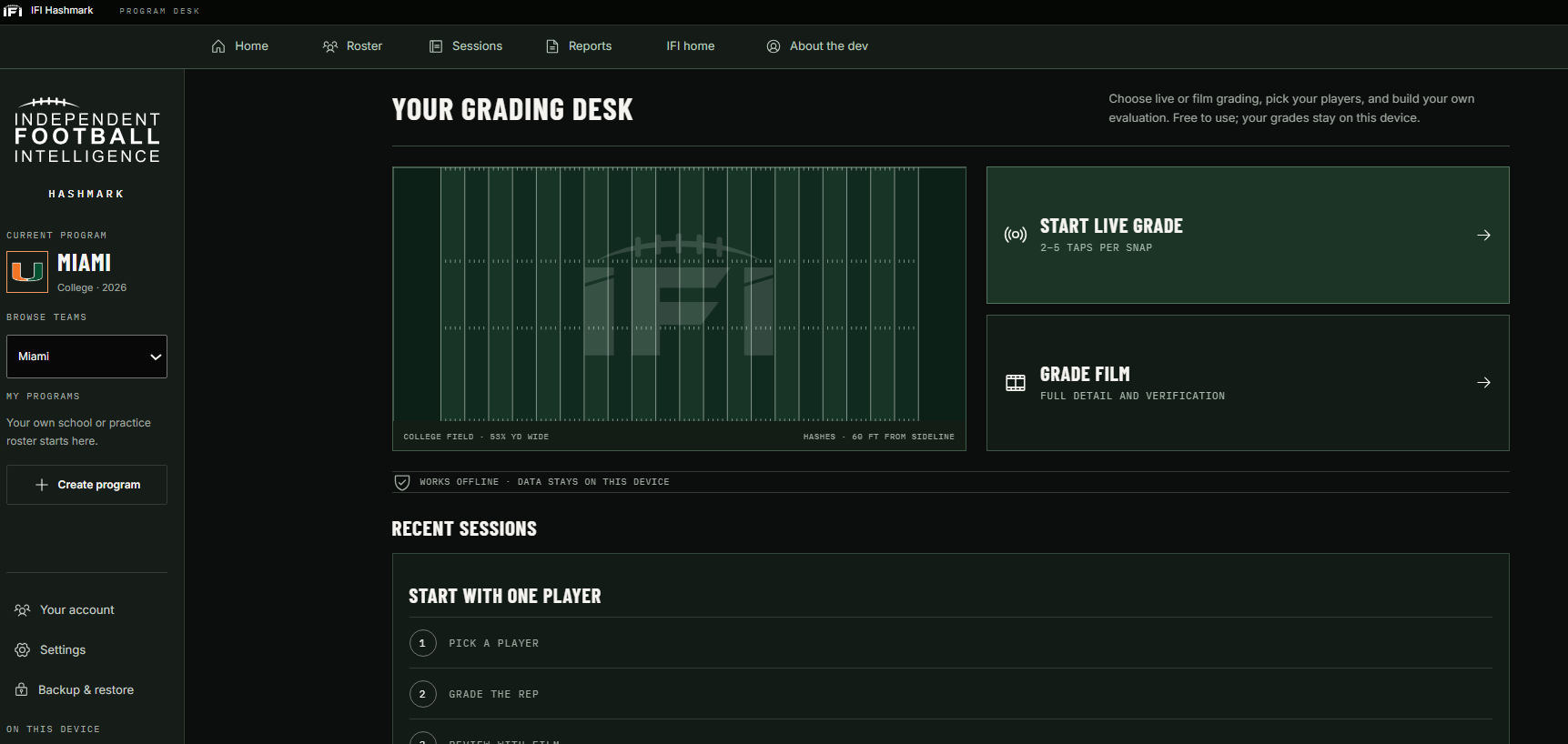
Start with one player and one question.
A useful first session has a narrow purpose. For a quarterback, you might track the final pass result before adding placement and pressure context. For a cornerback, you might start with coverage reps and whether the player was targeted. Select the position template that matches the role you are observing; the available questions change with the role and rep type.
- Choose your roster. The web app includes college rosters, or you can create your own program and players. Confirm the player and team before starting; a familiar jersey number is not enough to identify a player.
- Create a game or practice session. Set the matchup, date, live or film mode, and player. Check the starting quarter, clock and field rules. The field context helps you find the play again later.
- Choose a workable level of detail. Live observation may support fewer fields than a replay. Record what you can see and return to uncertain details during film review.
Open the grading desk to try the workflow. The website permits one guest session; sign in to create more sessions and use cloud sync.
Keep the play result and the player evaluation separate.
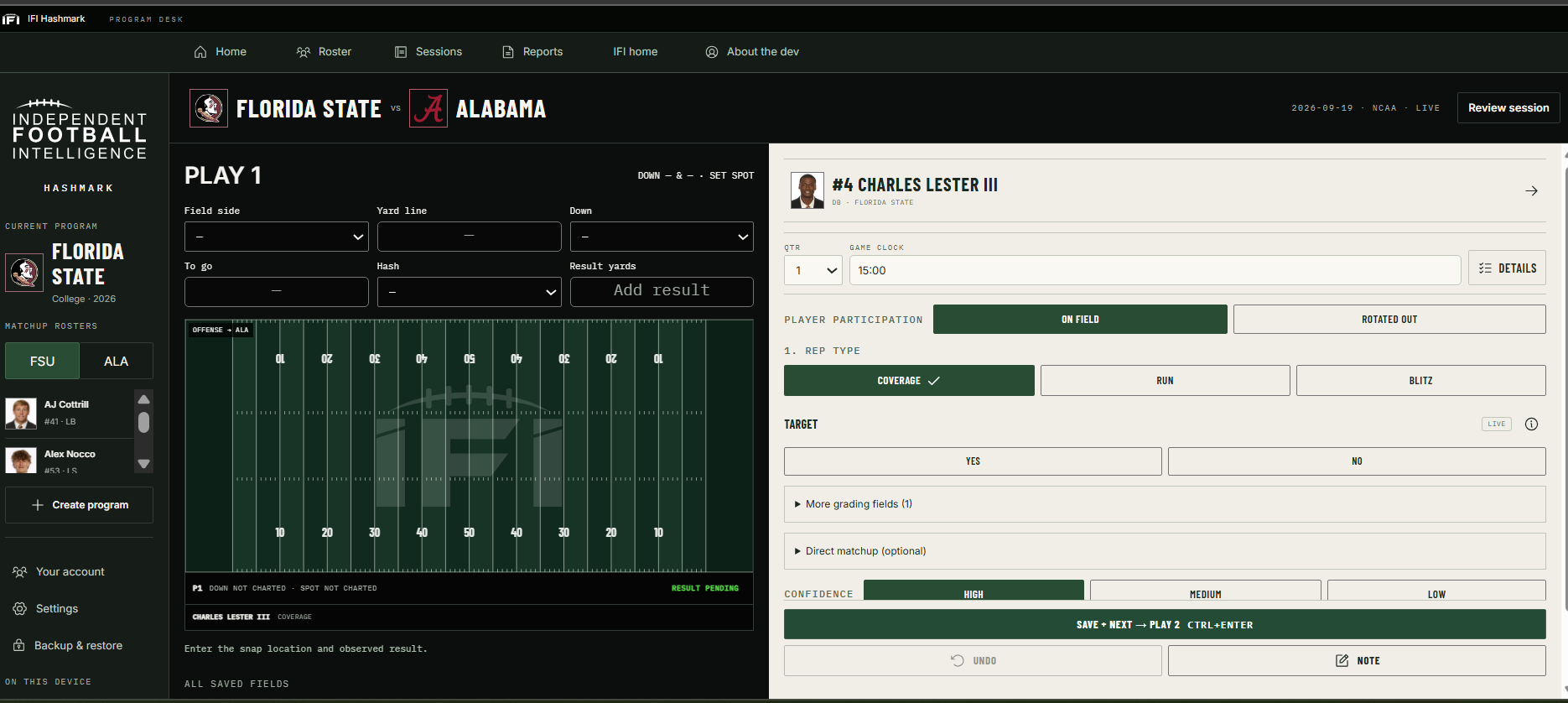
The field side, yard line, down, distance and hash describe the snap. Result yards describe where the play went. The position-specific controls describe the player's involvement. Choose the rep type before entering the detailed grade so the questions match the task: a coverage rep and a blitz are different opportunities.
Quarterback completions
When the ball result is a completion, Completion to lets you identify a player from the quarterback's roster. It is not restricted to receivers: a back, tight end or another rostered player can be selected. That identity supplies context; it is not a substitute for charting the quarterback's decision or the recipient's own rep.
Defensive matchups and field markers
Use the optional direct matchup to identify a player on the opposing roster. A cornerback can be matched with a receiver, and a linebacker can be matched with a back or receiver. Selection is not limited to those examples. Check the team as well as the player name.
Player photos and optional locations make the saved field easier to read. Locations belong to the individual rep. They represent the spots you charted, not optical tracking or a measured route. Leave a location unknown when the film does not support it. A field image is a memory aid; your observation and note explain the action.
Read the sample before the percentage.
Hashmark reports are built from the reps you chart and the filters you select. A report for one player or one subset of plays is not automatically a complete official game stat line. Before comparing two reports, check the player, template, rep types, filters and amount of film reviewed.
Worked example: quarterback completion percentage
Suppose you chart 10 resolved pass attempts: 6 completions, 3 incompletions and 1 spike. Completion percentage is 6 / 10 = 60%. A separately charted sack is not a pass attempt in this calculation. A missing final result is not an incompletion; resolve the missing observation before treating the displayed rate as complete.
This is a hypothetical calculation, not a player statistic. Completion percentage also does not tell you whether the quarterback made a good decision on each throw.
Worked example: cornerback coverage wins
Suppose all 10 coverage reps have a coverage result: 2 Major Wins, 4 Wins, 2 Neutral results and 2 Losses. The coverage-win numerator includes Win and Major Win, giving 6 / 10 = 60%. Neutral is graded but is not a win. An additional rep with a missing coverage result is not Neutral; the missing charting must be resolved for the affected metric.
Coverage win rate and receptions allowed answer different questions. Record the coverage evaluation and the targeted ball result separately rather than inferring one from the other.
What blank or unavailable results mean
An unavailable metric can mean there were no eligible opportunities, or that an observation needed for the calculation is missing. Those cases are different from a measured zero. Use the metric's explanation and play evidence to find the gap. A small sample should also stay visible in your interpretation: 3 wins in 4 opportunities and 30 in 40 produce the same percentage but carry different amounts of evidence.
In outcome summaries, Win and Major Win count as wins; Loss and Major Loss count as losses. Neutral stays separate, and missing overall grades remain ungraded. Role-specific metrics use their own definitions and qualifying opportunities, so a quarterback decision grade should not be read as the same measurement as a coverage result or blocking result.
Make the second pass useful.
After the session, revisit uncertain plays rather than forcing a confident answer during the game. Film corrections retain the original live observation in audit history. Keep confidence, verification and performance separate: confidence describes how certain you are, film verification describes review status, and the grade describes your evaluation.
A helpful note identifies the observable action and the uncertainty. For example: “Lost outside leverage at the break; safety responsibility not clear from this angle.” That is more useful on a later review than a number without context. Do not invent an assignment when the available film does not establish it.
Before sharing a report, confirm the intended player and filters, inspect the contributing plays, resolve missing charting where possible, and keep any remaining limitations with your interpretation. Hashmark preserves the work behind your judgement; it does not independently validate that judgement.
Choose where your work lives.
| Edition | Roster and workflow | Keeping your work |
|---|---|---|
| Web | College roster browsing and custom programs; use it on desktop or mobile. | Guest work stays in that browser. Signed-in workspaces support cloud sync. Export a backup before clearing browser data. |
| Windows Coach | A Windows app for your own program and roster, with team logos and player photos. It does not bundle the website's full college-player catalog. | Designed for local work and offline use. Use Backup & restore to keep a separate copy of your program. |
A downloaded report is useful for sharing an evaluation. A complete backup is for recovery of your workspace. Keep backups somewhere separate from the browser or computer you use to grade.
Use Hashmark on the webWindows download and installation detailsPrivacy and data handling
Tools for the work around the game.
TapeSift
Use TapeSift to organize film: log practices and games, track plays, find moments again, and turn long film into clips. Hashmark is where you record the player evaluation. These are separate tools; this guide does not imply that clips or grades automatically transfer between them. Explore TapeSift.
ScriptSurgeon
ScriptSurgeon is a local app for editing spoken audio through its transcript. It serves the editing work around video and audio, rather than football grading. Explore ScriptSurgeon.
For the reason behind IFI, read Art's author note. For product questions or to discuss football film, join the IFI community.